My NeoVim Setup
A walkthrough of my Neovim 0.12 config: a single init.lua built on kickstart.nvim, the plugins I actually use, and the fixes that came out of real work — one tsserver instead of eleven in a monorepo, an ESLint circular-structure bug that silently kills diagnostics, on-demand treesitter parsers, autoreload for AI-edited files, and a full keymap reference.
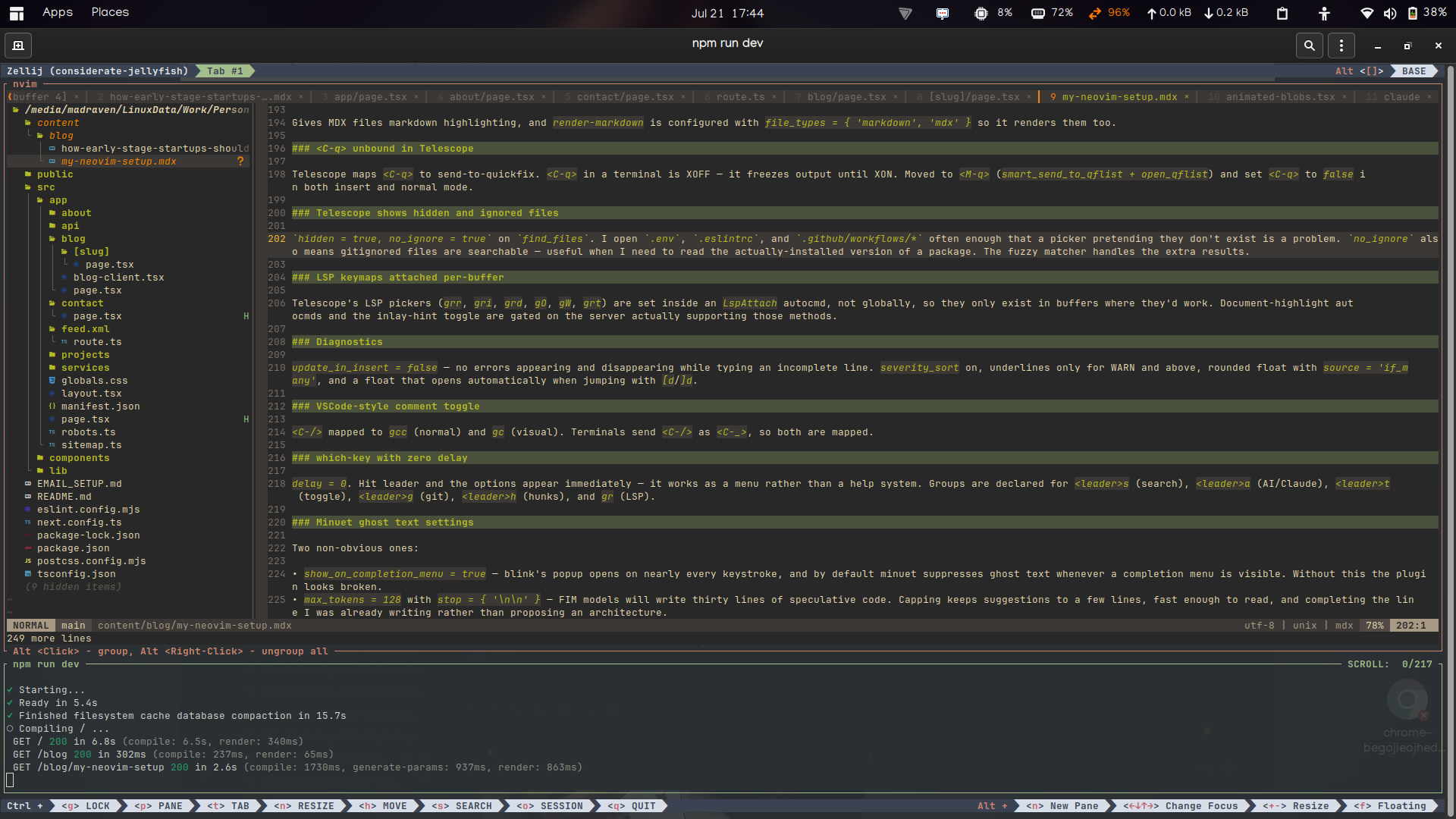
My Neovim Setup
Base is kickstart.nvim, running on Neovim 0.12, kept as a single init.lua (~1,400 lines) split into do ... end sections.
I work on TypeScript in a monorepo and Shopify themes in Liquid, usually over SSH across several machines. Most of what follows exists because of one of those two things.
Neovim runs inside zellij, which handles panes, tabs, and session persistence. Its interface is modern and more intuitive than the alternatives — discoverable keybindings, sane defaults, layouts that are worth configuring — and it's become a personal preference rather than something I had to learn my way around.
Plugins
Plugin management
| Plugin | Source | Why |
|---|---|---|
vim.pack | built-in | Neovim 0.12's built-in plugin manager. Add a git URL, call setup(). Startup ~40ms with vim.loader.enable(). |
Search and navigation
| Plugin | Source | Use |
|---|---|---|
telescope.nvim | nvim-telescope/telescope.nvim | Main picker. Files, grep, help, keymaps, commands, diagnostics, buffers. |
telescope-fzf-native.nvim | nvim-telescope/telescope-fzf-native.nvim | Native fzf sorter. Only added when make is available. |
telescope-ui-select.nvim | nvim-telescope/telescope-ui-select.nvim | Routes vim.ui.select through Telescope (dropdown theme). |
neo-tree.nvim | nvim-neo-tree/neo-tree.nvim | File tree, <leader>e to toggle with current file revealed. |
nvim-window-picker | s1n7ax/nvim-window-picker | <leader>W labels each window with a big letter; press it to jump. Neo-tree uses it for "open in which window". |
barbar.nvim | romgrk/barbar.nvim | Buffer tabline. <A-1>–<A-9> jump directly to a numbered buffer. |
mini.starter | nvim-mini/mini.nvim | Start screen with a custom recent-folders section. |
LSP and language tooling
| Plugin | Source | Use |
|---|---|---|
nvim-lspconfig | neovim/nvim-lspconfig | Server configs. Active: ts_ls, eslint, lua_ls, theme_check. |
fidget.nvim | j-hui/fidget.nvim | LSP progress in the corner instead of the message area. |
conform.nvim | stevearc/conform.nvim | Formatting. prettierd→prettier for web files, stylua for Lua, black for Python. |
nvim-treesitter (main branch) | nvim-treesitter/nvim-treesitter | Highlighting, indentation. Installs parsers on demand. |
vim-liquid | tpope/vim-liquid | Liquid filetype detection + embedded HTML/CSS/JS highlighting. |
Servers and formatters need to be on PATH.
Completion and AI
| Plugin | Source | Use |
|---|---|---|
blink.cmp | saghen/blink.cmp | LSP completion. default preset, Lua fuzzy matcher, signature help on. |
LuaSnip | L3MON4D3/LuaSnip | Snippet engine behind blink. Pinned to 2.*. |
minuet-ai.nvim | milanglacier/minuet-ai.nvim | Inline AI completion as ghost text via Mistral Codestral FIM. <A-a> accepts. |
claudecode.nvim | coder/claudecode.nvim | WebSocket bridge to the Claude Code CLI. Send buffers/selections as context, review edits as native diffs. All under <leader>a. |
Editing
| Plugin | Source | Use |
|---|---|---|
mini.ai | nvim-mini/mini.nvim | Extended text objects. Mappings moved to aa/ii to avoid colliding with 0.12's built-in incremental selection. |
mini.surround | nvim-mini/mini.nvim | Add/delete/replace surrounding pairs. |
mini.icons | nvim-mini/mini.nvim | Icons, with mock_nvim_web_devicons() for plugins that expect devicons. Only loaded if a Nerd Font is present. |
nvim-autopairs | windwp/nvim-autopairs | Auto-close pairs, check_ts = true so treesitter decides when a pair is invalid. |
guess-indent.nvim | NMAC427/guess-indent.nvim | Detects and sets indentation per file. |
Git
| Plugin | Source | Use |
|---|---|---|
gitsigns.nvim | lewis6991/gitsigns.nvim | Gutter signs, ASCII markers (+, ~, _). |
neogit | NeogitOrg/neogit | Magit-style Git UI on <leader>gg. |
diffview.nvim | sindrets/diffview.nvim | Richer diffs inside Neogit. |
UI
| Plugin | Source | Use |
|---|---|---|
gruvbox.nvim | ellisonleao/gruvbox.nvim | Colorscheme. |
lualine.nvim | nvim-lualine/lualine.nvim | Statusline. |
render-markdown.nvim | MeanderingProgrammer/render-markdown.nvim | In-buffer markdown rendering. |
nvim-colorizer.lua | catgoose/nvim-colorizer.lua | Renders hex/rgb color codes as swatches. Needs termguicolors. |
which-key.nvim | folke/which-key.nvim | Keymap hints, delay = 0. |
todo-comments.nvim | folke/todo-comments.nvim | Highlights TODO/NOTE/FIX in comments, signs off. |
Optimizations
1. One tsserver instead of eleven
ts_ls finds its project root by looking for package.json or tsconfig.json. In a monorepo every package has both, so opening files across five workspaces started five separate language servers, each indexing an overlapping part of the same tree. Some of them also survived Neovim exiting.
local function ts_root_dir(fname)
  return util.root_pattern('.git')(fname)
    or util.root_pattern('tsconfig.json', 'jsconfig.json', 'package.json')(fname)
end

lspconfig.ts_ls.setup {
  root_dir = ts_root_dir,
  detached = false,           -- dies with Neovim, no orphan processes
  single_file_support = false, -- a loose .ts file won't spawn its own server
}
Root at the git repo, project markers only as fallback for non-git trees. Same three settings applied to eslint.
2. ESLint circular-structure fix
ESLint produced no diagnostics at all in one project. The log said Converting circular structure to JSON. The server serializes its resolved config when answering pull diagnostics, and flat configs with self-referencing plugins (eslint-plugin-react's configs.flat.*) contain a cycle — so it returns nothing, and the failure never surfaces in the UI.
on_init = function(client) client.server_capabilities.diagnosticProvider = nil endRemoving the capability makes Neovim fall back to push diagnostics, which work.
3. Single formatter per language
lua_ls has formatting explicitly disabled (documentFormattingProvider = false on init, plus format.enable = false in settings) because stylua owns Lua formatting. Two formatters on one buffer produces diff churn.
Same idea in conform: stop_after_first = true on every prettier entry so it runs prettierd or prettier, never both.
4. Treesitter parsers install on demand
A FileType autocmd resolves the language, attaches if the parser is installed, installs asynchronously and then attaches if it isn't, and still tries to attach if the parser exists outside nvim-treesitter. Open a Rust file for the first time and highlighting appears a second later, permanently. No parser list to maintain.
5. No Nerd Font
vim.g.have_nerd_font = false, and everything reads that flag. Markdown headings render as literal #, bullets as plain Unicode, barbar and lualine drop filetype icons, powerline separators become |.
I work over SSH into containers and on machines I didn't configure. Missing glyphs render as empty boxes, so the config assumes the font isn't there rather than assuming it is.
6. Global statusline
globalstatus = true in lualine — one statusline for the whole window instead of one per split. With a terminal column and a file tree open, per-window statuslines spend three rows showing the same information three times.
7. Build steps wired to PackChanged
vim.pack doesn't run build commands, so an autocmd on PackChanged handles them: make for telescope-fzf-native, make install_jsregexp for LuaSnip, TSUpdate for treesitter. run_build uses vim.system():wait() and pushes stderr through vim.notify on non-zero exit — silent build failures are how you end up with a fuzzy finder that's mysteriously slow for a month.
Custom features
Autosave
Writes the buffer 500ms after InsertLeave or TextChanged. The guard clauses are the important part — skip unnamed buffers, non-empty buftype (terminals, help, plugin UIs), unmodifiable, unmodified, and readonly buffers. Without them it errors constantly. The defer_fn debounces so it isn't writing per keystroke.
Autoreload
Needed because AI tooling edits files while I have them open. autoread alone does nothing useful in a terminal — Neovim only checks mtime when something runs :checktime, which in a GUI happens on window focus and in a terminal basically never.
vim.api.nvim_create_autocmd(
  { 'FocusGained', 'BufEnter', 'CursorHold', 'CursorHoldI', 'TermClose', 'TermLeave' }, {
  callback = function()
    if vim.fn.mode() ~= 'c' and vim.bo.buftype == '' then vim.cmd 'silent! checktime' end
  end,
})
CursorHold fires after updatetime (250ms), so the buffer refreshes shortly after I stop typing. TermClose/TermLeave catch scripts I ran in a split. A FileChangedShellPost autocmd notifies when a reload actually happened.
Terminals stack in a right-hand column
<leader>tt scans open windows for a terminal buffer. If there is one, focus it and split | terminal so the new terminal stacks beneath. If there isn't, botright vsplit | terminal to claim the right side. Then startinsert.
<leader>tk deletes every terminal buffer, which also closes their windows.
Jump back to the editor
focus_editor() finds the first window whose buffer has an empty buftype and isn't neo-tree, and focuses it. Bound to <leader>w.
Leader is space, and a space in a terminal is just a space, so terminal mode gets <C-w>w instead: stopinsert, then focus_editor().
Recent folders on the start screen
Neovim tracks recent files, not folders. The start screen derives folders from :oldfiles — take each file's parent directory, drop duplicates, drop directories that no longer exist, keep the first ten in order, display them relative to $HOME. Added as a custom mini.starter section above the built-in actions.
MDX support
.mdx gets detected as conf by default, so no highlighting at all. There's no dedicated MDX parser either.
vim.filetype.add { extension = { mdx = 'mdx' } }
vim.treesitter.language.register('markdown', 'mdx')
Gives MDX files markdown highlighting, and render-markdown is configured with file_types = { 'markdown', 'mdx' } so it renders them too.
Telescope shows hidden and ignored files
hidden = true, no_ignore = true on find_files. I open .env, .eslintrc, and .github/workflows/* often enough that a picker pretending they don't exist is a problem. no_ignore also means gitignored files are searchable — useful when I need to read the actually-installed version of a package. The fuzzy matcher handles the extra results.
LSP keymaps attached per-buffer
Telescope's LSP pickers (grr, gri, grd, gO, gW, grt) are set inside an LspAttach autocmd, not globally, so they only exist in buffers where they'd work. Document-highlight autocmds and the inlay-hint toggle are gated on the server actually supporting those methods.
Diagnostics
update_in_insert = false — no errors appearing and disappearing while typing an incomplete line. severity_sort on, underlines only for WARN and above, rounded float with source = 'if_many', and a float that opens automatically when jumping with [d/]d.
which-key with zero delay
delay = 0. Hit leader and the options appear immediately — it works as a menu rather than a help system. Groups are declared for <leader>s (search), <leader>a (AI/Claude), <leader>t (toggle), <leader>g (git), <leader>h (hunks), and gr (LSP).
Minuet ghost text settings
Two non-obvious ones:
show_on_completion_menu = true— blink's popup opens on nearly every keystroke, and by default minuet suppresses ghost text whenever a completion menu is visible. Without this the plugin looks broken.max_tokens = 128withstop = { '\n\n' }— FIM models will write thirty lines of speculative code. Capping keeps suggestions to a few lines, fast enough to read, and completing the line I was already writing rather than proposing an architecture.
The API key is read from $CODESTRAL_API_KEY; the config only contains the variable name.
Custom plugin loader follows symlinks
lua/custom/plugins/init.lua iterates the directory and requires every .lua file except itself, accepting type == 'link' as well as 'file' and passing follow = true to vim.fs.dir, so symlinked plugin files load.
Keymap reference
| Key | Action |
|---|---|
<leader> | Space |
<leader>e | Toggle file tree |
<leader>w / <C-w>w | Focus editor window (normal / terminal) |
<leader>W | Pick window by label |
<leader>tt / <leader>tk | New terminal / kill all terminals |
<leader>f | Format buffer |
<leader>q | Diagnostics to loclist |
<leader>gg | Neogit |
<leader>sf <leader>sg <leader>sw | Find files / live grep / grep word |
<leader>sh <leader>sk <leader>sc | Search help / keymaps / commands |
<leader>sn | Search Neovim config files |
<leader>/ | Fuzzy find in current buffer |
<leader><leader> | Buffers |
<leader>ac <leader>ab <leader>as | Claude: toggle / add buffer / send selection |
<leader>aa <leader>ad | Claude: accept / deny diff |
<A-1>–<A-9>, <A-,> <A-.> <A-c> | Buffer jump / prev / next / close |
<A-a> <A-l> <A-]> <A-[> | AI ghost text: accept / accept line / next / prev |
<C-hjkl> | Window navigation |
<C-/> | Toggle comment |
grn gra grd grr gri | LSP: rename / code action / definition / references / implementation |